Canyon Report
A frontend code coverage visualization component (Library) based on Monaco Editor. Provides line coverage count, changed line markers, and syntax block (statements/functions/branches) uncovered highlighting capabilities, suitable for quickly rendering single-file level coverage details in web pages.
Interface Introduction
Interface Graphics Display
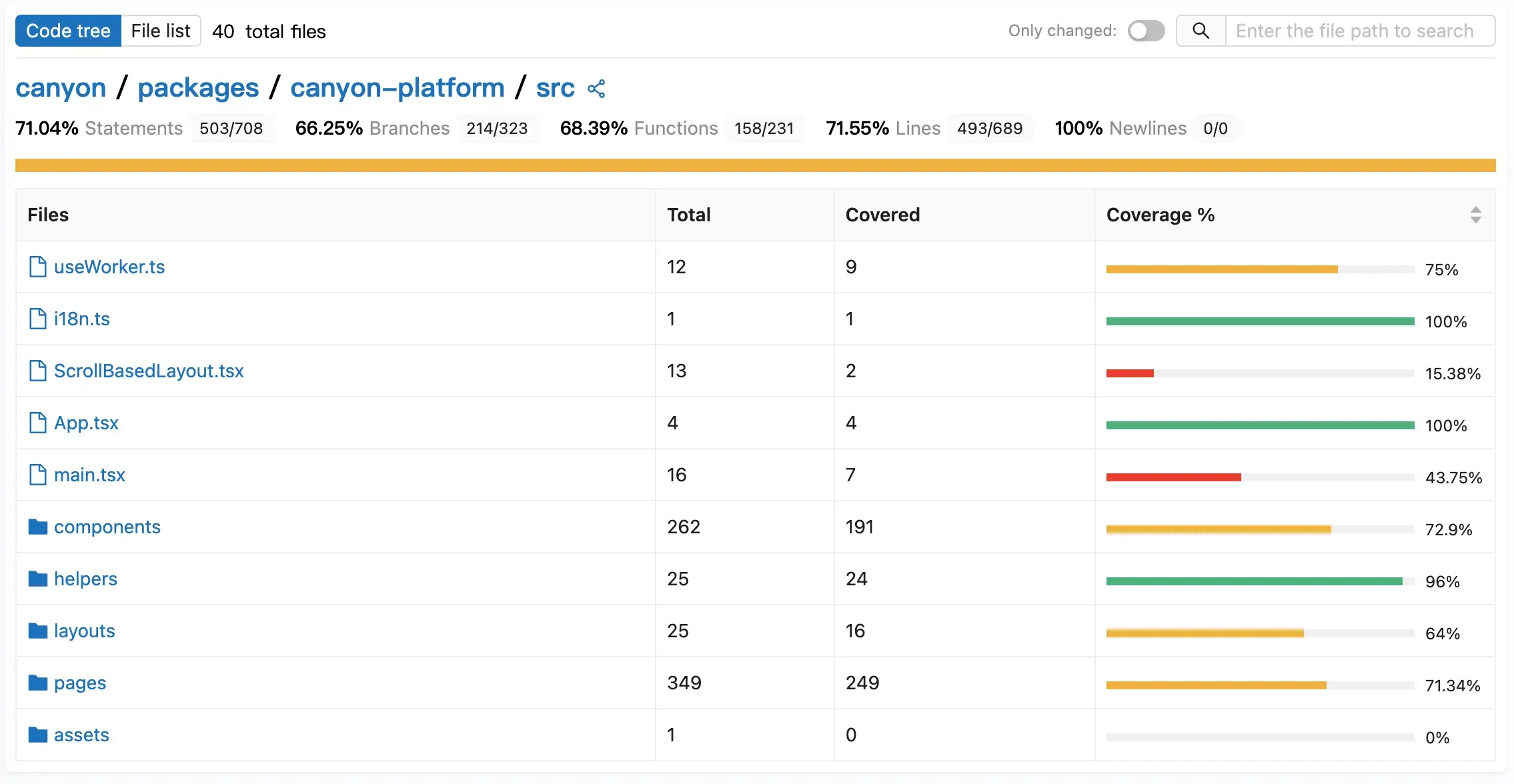
Interface Color Coding
| Color | pct (Coverage Percentage) | Description |
|---|---|---|
| Green | pct >= 80 | Statement coverage greater than or equal to 80 |
| Yellow | pct >= 50 && pct < 80 | Statement coverage greater than or equal to 50 and less than 80 |
| Red | pct < 50 | Statement coverage less than 50 |
Interface Area Functions
- Top Control Bar (TopControl )
  View mode toggle: Switch between "code tree" and "file list" views
  Changed file filter: "Show changed only" toggle, filter to show files with code changes
  File search: Enter file path keywords to search and filter
File statistics: Display total number of files under current filter conditions- Summary Header Area (SummaryHeader )
  Project path navigation: Display current project path hierarchy

  Coverage statistics overview: Display key coverage metrics
    Statement Coverage (Statements)
    Branch Coverage (Branches)
    Function Coverage (Functions)
    Line Coverage (Lines)
    New Line Coverage (New Lines)
    Changed Function Coverage (Changed Functions)
    Changed Branch Coverage (Changed Branches)
Changed Statement Coverage (Changed Statements)- Content Area (SummaryTree /SummaryList )
  Table display: Display file list in table format
  Column information: File name, total count, covered count, coverage percentage
  Progress bar: Visually display coverage level
File type icons: Distinguish files and folders- SPA Component (CoverageDetail )
  Green: Display execution count on the line number side.
  Dark green: Changed markers displayed on the line number side, highlight changed lines by passing diff.
  Red: Uncovered statements and functions
  Yellow: Incompletely covered branch code
Installation
npm install canyon-reportBasic Usage
import Report from "canyon-report";

function App() {
  const dataSource = {
    // Istanbul coverage data
  };

  const handleSelect = async (filePath) => {
    // Return detailed information of selected file
    return {
      fileContent: "File content",
      fileCoverage: {}, // Istanbul FileCoverageData
      fileCodeChange: [], // Array of changed line numbers
    };
  };

  return (
    <Report
      theme="light"
      language="cn"
      name="Project Name"
      dataSource={dataSource}
      value="Currently selected file path"
      onSelect={handleSelect}
      defaultOnlyShowChanged={false}
    />
  );
}
API Parameters
| Parameter | Type | Description |
|---|---|---|
| theme | ThemeEnum | Theme mode |
| language | LanguageEnum | Interface language |
| name | string | Project name |
| dataSource | { [key: string]: CoverageSummaryData & { path: string,change:boolean } } | Coverage data source |
| value | string | Currently selected file |
| onSelect | (val: string) => Promise<{fileCoverage: FileCoverageData;fileContent: string; fileCodeChange: number[]; }> | |
| defaultOnlyShowChanged | boolean | Whether to show only changed files by default |
数据结构
CoverageSummaryData
interface CoverageSummaryData {
  lines: Totals;
  statements: Totals;
  branches: Totals;
  functions: Totals;
}
Totals
interface Totals {
  total: number;
  covered: number;
  skipped: number;
  pct: number;
}
FileCoverageData
interface FileCoverageData {
  path: string;
  statementMap: { [key: string]: Range };
  fnMap: { [key: string]: FunctionMapping };
  branchMap: { [key: string]: BranchMapping };
  s: { [key: string]: number };
  f: { [key: string]: number };
  b: { [key: string]: number[] };
}
BranchMapping
export interface BranchMapping {
  loc: Range;
  type: string;
  locations: Range[];
  line: number;
}
FunctionMapping
export interface FunctionMapping {
  name: string;
  decl: Range;
  loc: Range;
  line: number;
}
Range
interface Range {
  start: Location;
  end: Location;
}
Location
interface Location {
  line: number;
  column: number;
}
ThemeEnum
enum ThemeEnum {
  Light = "light",
  Dark = "dark",
}
LanguageEnum
enum LanguageEnum {
  CN = "cn",
  EN = "en",
  JA = "ja",
}
数据示例
dataSource
{
  "src/App.tsx": {
    "branches": { "covered": 0, "pct": 100, "skipped": 0, "total": 0 },
    "change": false,
    "functions": {
      "covered": 1,
      "pct": 33.33333333333333,
      "skipped": 0,
      "total": 3
    },
    "lines": { "covered": 2, "pct": 50, "skipped": 0, "total": 4 },
    "path": "src/App.tsx",
    "statements": { "covered": 2, "pct": 50, "skipped": 0, "total": 4 }
  },
  "src/components/A0.tsx": {
    "branches": { "covered": 0, "pct": 100, "skipped": 0, "total": 0 },
    "change": false,
    "functions": { "covered": 1, "pct": 100, "skipped": 0, "total": 1 },
    "lines": { "covered": 2, "pct": 100, "skipped": 0, "total": 2 },
    "path": "src/components/A0.tsx",
    "statements": { "covered": 2, "pct": 100, "skipped": 0, "total": 2 }
  },
  "src/components/B0.tsx": {
    "branches": { "covered": 0, "pct": 100, "skipped": 0, "total": 0 },
    "change": false,
    "functions": { "covered": 3, "pct": 100, "skipped": 0, "total": 3 },
    "lines": { "covered": 6, "pct": 100, "skipped": 0, "total": 6 },
    "path": "src/components/B0.tsx",
    "statements": { "covered": 6, "pct": 100, "skipped": 0, "total": 6 }
  },
  "src/components/C0.tsx": {
    "branches": { "covered": 1, "pct": 100, "skipped": 0, "total": 0 },
    "change": false,
    "functions": { "covered": 2, "pct": 100, "skipped": 0, "total": 2 },
    "lines": {
      "covered": 5,
      "pct": 83.33333333333334,
      "skipped": 0,
      "total": 6
    },
    "path": "src/components/C0.tsx",
    "statements": {
      "covered": 5,
      "pct": 83.33333333333334,
      "skipped": 0,
      "total": 6
    }
  },
  "src/main.tsx": {
    "branches": { "covered": 0, "pct": 100, "skipped": 0, "total": 0 },
    "change": false,
    "functions": { "covered": 1, "pct": 100, "skipped": 0, "total": 1 },
    "lines": { "covered": 3, "pct": 100, "skipped": 0, "total": 3 },
    "path": "src/main.tsx",
    "statements": { "covered": 3, "pct": 100, "skipped": 0, "total": 3 }
  }
}
handleSelect 返回内容
{
    fileContent:"import { useState } from 'react'\nimport reactLogo from './assets/react.svg'\nimport viteLogo from '/vite.svg'\nimport './App.css'\nimport A0 from \"./components/A0.tsx\";\nimport B0 from \"./components/B0.tsx\";\nimport C0 from \"./components/C0.tsx\";\nfunction App() {\n  const [count, setCount] = useState(0)\n  return (\n    <>\n        <A0></A0>\n        <B0></B0>\n        <C0></C0>\n      <div>\n        <a href=\"https://vite.dev\" target=\"_blank\">\n          <img src={viteLogo} className=\"logo\" alt=\"Vite logo\" />\n        </a>\n        <a href=\"https://react.dev\" target=\"_blank\">\n          <img src={reactLogo} className=\"logo react\" alt=\"React logo\" />\n        </a>\n      </div>\n      <h1>Vite + React123</h1>\n      <div className=\"card\">\n        <button onClick={() => setCount((count) => count + 2)}>\n          count is {count}\n        </button>\n        <p>\n          Edit <code>src/App.tsx</code> and save to test HMR\n        </p>\n      </div>\n      <p className=\"read-the-docs\">\n        Click on the Vite and React logos to learn more\n      </p>\n    </>\n  )\n}\n\nexport default App\n"
    fileCodeChange: [26,27,28],
    fileCoverage:{
        "b": {},
        "branchMap": {},
        "f": { "0": 151, "1": 0, "2": 0 },
        "fnMap": {
            "0": {
            "decl": {
                "end": { "column": 12, "line": 8 },
                "start": { "column": 9, "line": 8 }
            },
            "line": 8,
            "loc": {
                "end": { "column": 1, "line": 37 },
                "start": { "column": 15, "line": 8 }
            },
            "name": "App"
            },
            "1": {
            "decl": {
                "end": { "column": 26, "line": 25 },
                "start": { "column": 25, "line": 25 }
            },
            "line": 25,
            "loc": {
                "end": { "column": 61, "line": 25 },
                "start": { "column": 31, "line": 25 }
            },
            "name": "(anonymous_1)"
            },
            "2": {
            "decl": {
                "end": { "column": 41, "line": 25 },
                "start": { "column": 40, "line": 25 }
            },
            "line": 25,
            "loc": {
                "end": { "column": 60, "line": 25 },
                "start": { "column": 51, "line": 25 }
            },
            "name": "(anonymous_2)"
            }
        },
        "path": "src/App.tsx",
        "s": { "0": 172, "1": 151, "2": 0, "3": 0 },
        "statementMap": {
            "0": {
            "end": { "column": 39, "line": 9 },
            "start": { "column": 28, "line": 9 }
            },
            "1": {
            "end": { "column": 3, "line": 36 },
            "start": { "column": 2, "line": 10 }
            },
            "2": {
            "end": { "column": 61, "line": 25 },
            "start": { "column": 31, "line": 25 }
            },
            "3": {
            "end": { "column": 60, "line": 25 },
            "start": { "column": 51, "line": 25 }
            }
        }
        }
}